Office mouse, wireless

Hama Optical 6-button wireless mouse “MW-600", Dual mode with USB-C / USB-A, black

00182616

Control two PCs with one mouse? Our "MW-600" wireless mouse can. The ergonomic mouse is equipped with two radio receivers - for USB-A and USB-C. This means you can connect the dual mouse simultaneously to a computer and laptop and toggle between the two devices at the press of a button.

24.99   GBP
Search retail shop
Search retail shop
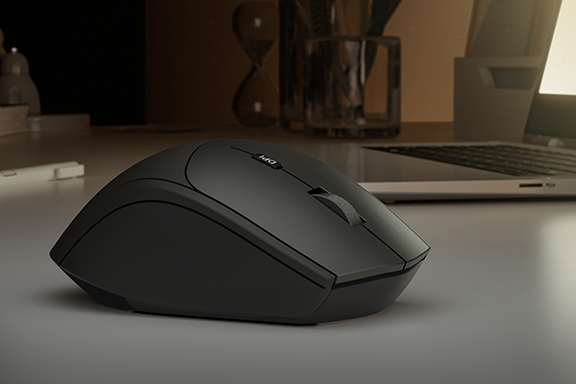
The Hama optical 6-button wireless mouse "MW-600" with dual mode with USB-C / USB-A is lying on a desk with a laptop in the background
Hama Optical 6-button wireless mouse “MW-600", Dual mode with USB-C/USB-A

Our "MW-600" wireless mouse with dual mode

You are a real multi-tasking wizard and work at two computers at the same time. A design program or the software you are currently developing is running on your computer and you have your laptop to check your e-mail and skype with colleagues. Up to now, you have controlled your laptop and PC using two different mice, though you frequently find yourself grasping hold of the wrong one.

Our innovative dual-mode mouse, the "MW-600", takes on the job of two mice. This means you can use the same mouse to operate your laptop and desktop PC, giving you more space on your desk. Simply press a button to switch between the two devices.
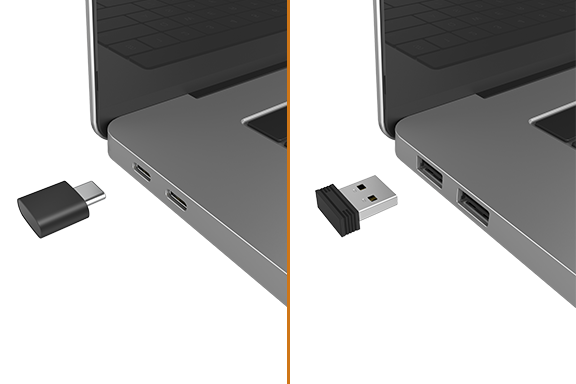
USA-A and USB-C receivers for full flexibility

Our wireless mouse comes with two wireless receivers. Most desktop computers have a USB-A port – the USB-A receiver is therefore ideal for connecting our optical mouse to your PC. Many notebooks and tablets, on the other hand, now have only USB-C ports. Our six-button mouse therefore also comes with a USB-C receiver and doesn’t require an adapter.

The Mode button on the bottom of the mouse allows you to switch back and forth between your computer and laptop super fast – without having to remove and reinsert the receivers. You can see at a glance which device you are currently connected to: When the "MW-600" is connected wirelessly to the USB-A receiver, a red light is lit on the left side of the mouse. A connection to the USB-C receiver is indicated by a green light.

Super-quiet buttons and almost as quiet as a mouse

Click, click, click – do you wish you could concentrate on the job at hand in a relaxed manner instead of being constantly distracted by annoying clicking sounds? From now on, you and your colleagues can work undisturbed, as the buttons of our computer mouse are virtually silent. Instead of getting on your nerves with loud clicks, the "MW-600" provides you with ultra quiet support at the computer, laptop or tablet.

Ergonomic mouse with 6 buttons for right-handers

The two thumb buttons allow you to easily navigate within an Internet browser and quickly go back and forth between web pages. You use the Dpi button to alter the speed of the mouse pointer. You can set the sensitivity to 1000, 1500, 2000 or 2400 dpi. Thanks to its ergonomic shape, the wireless mouse nestles pleasantly in your right hand, and can be controlled with a loose grip, ensuring your hand does not become too tense. In daily office life, when you’re sitting at the PC for eight hours or more, an ergonomic mouse can help prevent tension or the dreaded ‘mouse arm’.

Our tip: Stretching exercises relax the muscles and allow you to continue your work with renewed energy.

More information on ergonomics in the workplace

USB receivers cleverly stored

Do you sometimes go on business trips? The two USB receivers can be stored and transported inside the mouse to save space. Practical, don’t you think? The small receivers no longer tumble around loosely in your bag or, even worse, get lost. Dongles and the PC mouse are always together as one unit, and you can get to work immediately without having to look for the USB receivers.

Intelligent mouse with power saving mode

Our ergonomic mouse is an energy saving professional. It knows when it is not needed and activates the standby mode. You can switch the mouse off yourself, and save power, using the separate on/off switch on the bottom. An indicator light lets you know in good time when the batteries are running low.

Quality based on German standards
From the initial sample to series maturity: our products undergo strict and comprehensive quality controls, managed and carried out in Germany. This enables us to guarantee compliance with all specifications, guidelines and standards – and satisfy the strictest demands.

Highlights

Dual mode with USB-C and USB-A

Complete flexibility at the press of a button: in dual mode, switch between USB-C and USB-A receivers and control two devices with different USB connections with one wireless mouse

Browser buttons

Browser buttons provide quick access to the forward/back function for easy navigation, e.g. in web browsers, Outlook, etc.

dpi switch

Dpi switch for adjusting the pointer speed

Storable USB receiver

Storable USB receivers can be transported inside the mouse to save space

Whisper-quiet keys

Whisper-quiet keys for undisturbed and relaxed working

Perfect ergonomics

The ergonomic shape nestles comfortably in your right hand, allowing comfortable working for right-handed users

Intelligent energy management

Intelligent energy management activates standby mode when not in use

On/off switch

Separate on/off switch allows for energy-saving use of the mouse

Technical Specs
Power supply information
Power supply included: No
Design (Colour, Pattern, Motif, Series)
Colour Black/Grey
Form factor Right handed
Shade of colour Anthracite/Black
Connectivity (Connection)
Connection 2.4 GHz RF
Connection USB-C-plug/USB-Typ-A-Plug
Electrospecific Properties
Battery life (depending on usage) 240 d
Compatible operating systems Android 3.1 or higher/Windows 11/10/8/7/iOS 13 or higher
DPI-Range 1000/1500/2000/2400
Max. DPI 2400
Range 10 m
Special features Battery stand LED/Browser key/Dual mode/On/Off Switch/Power saving mode/Rubberised surface
Physical Properties
Model Ergonomic/Standard Mouse
Mouse - Keys Whisper
Mouse - Sliding Pads Polytetrafluoroethylene (PTFE)
Mouse wheel (material) Metal
Number of dpi buttons 1
Number of Mouse Buttons 6 Buttons incl. Scroll Wheel
Sensors Optical
Size & Weight
Width x Height x Depth 7 x 4.2 x 10.3 cm
Energy
Battery Type AA Mignon
Number of Batteries 1
Funkanlagenrichtline
Power supply included No
Required high performance power supply Not relevant
Required minimum power supply Not relevant
USB PD No
More product information
  • Optical 6-button wireless mouse with two receivers for optional connection to USB-A & USB-C ports
  • Switchable sensitivity between 1000, 1500, 2000 and 2400 dpi
  • Reliable 2.4 GHz wireless technology with a range of 10 metres (depending on use and environmental conditions)
What's in the Box
  • 1 "MW-600" optical 6-button wireless mouse
  • 1 USB-A receiver
  • 1 USB-B receiver
  • 1 AA Mignon battery
  • 1 operating manual
System Requirements
  • Operating system: Windows 11/10/8/7/Vista/XP, Android 3.1 or later, iOS 13 or later, USB-A or USB-C
Manufacturer information Hama GmbH & Co KG, 86652, Monheim, https://hama.com

Downloads

Manuals

multilingual
Download

Declaration of Conformity

Download

Battery Note

multilingual
Download